
Elixil3
-
Posts
425 -
Joined
-
Last visited
Content Type
Profiles
Forums
Help
Issues
FAQ
Gallery
Store
Events
Applications
Everything posted by Elixil3
-
I think this is a brilliant combo with the Slavage hammer. As Roz mentioned sometimes you would like to downgrade a wall for aesthetics but may contain a bunch of electrical components, signs etc. I'll support this.
-
Ok so I have got a few more reports of this and they are all players from the US playing on the AU servers so I suspect its a latency issue to the servers that are not loading the images fast enough upon log in. @Chinaski Can you confirm if this is a issue for you on the US servers or if its just localised to the servers outside the US where your latency is higher?
-
After todays AU Survival restart I have seen no pipes get remove nor do I have any of the logs showing up in my previous message. Will continue to monitor
-
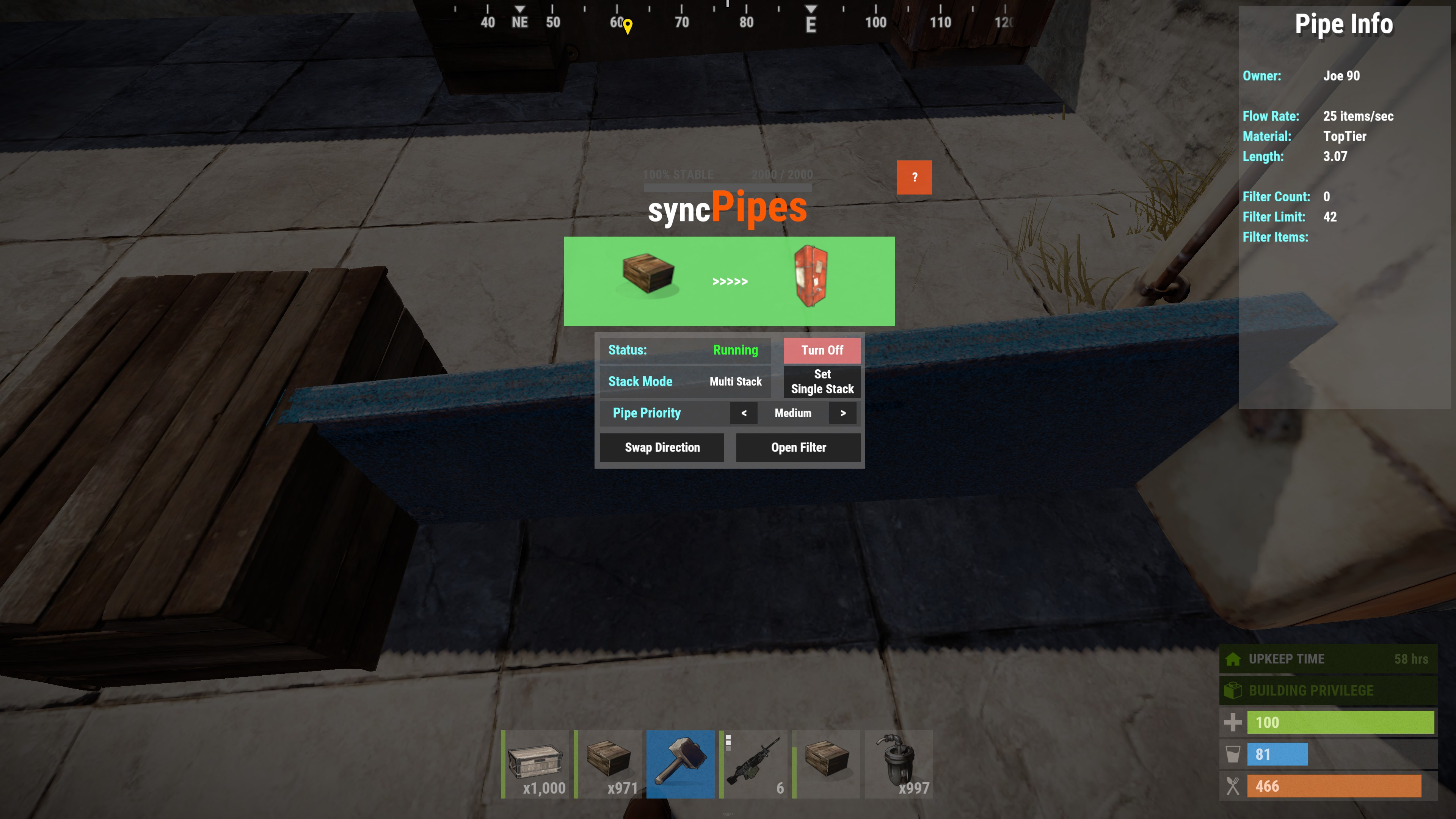
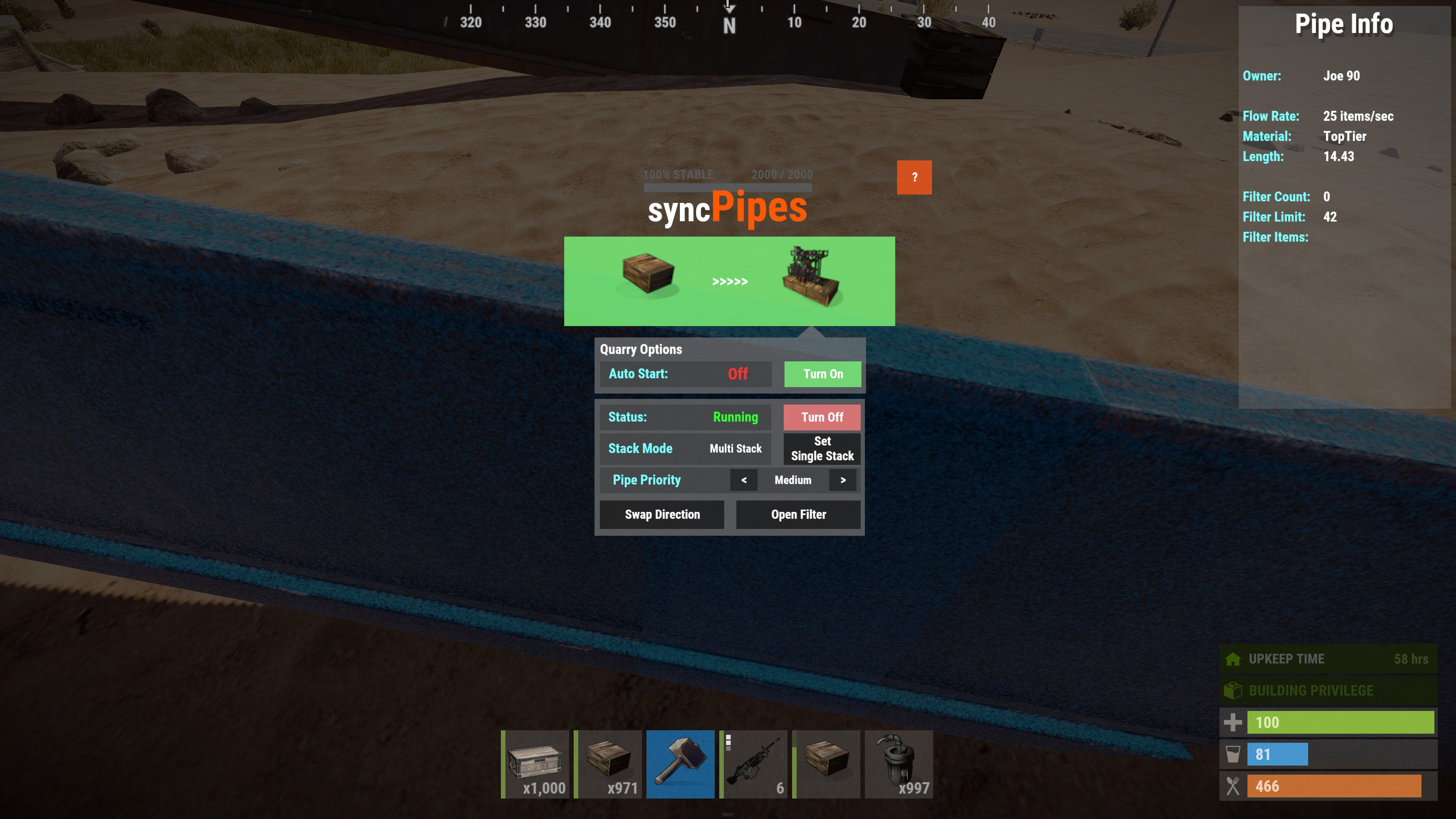
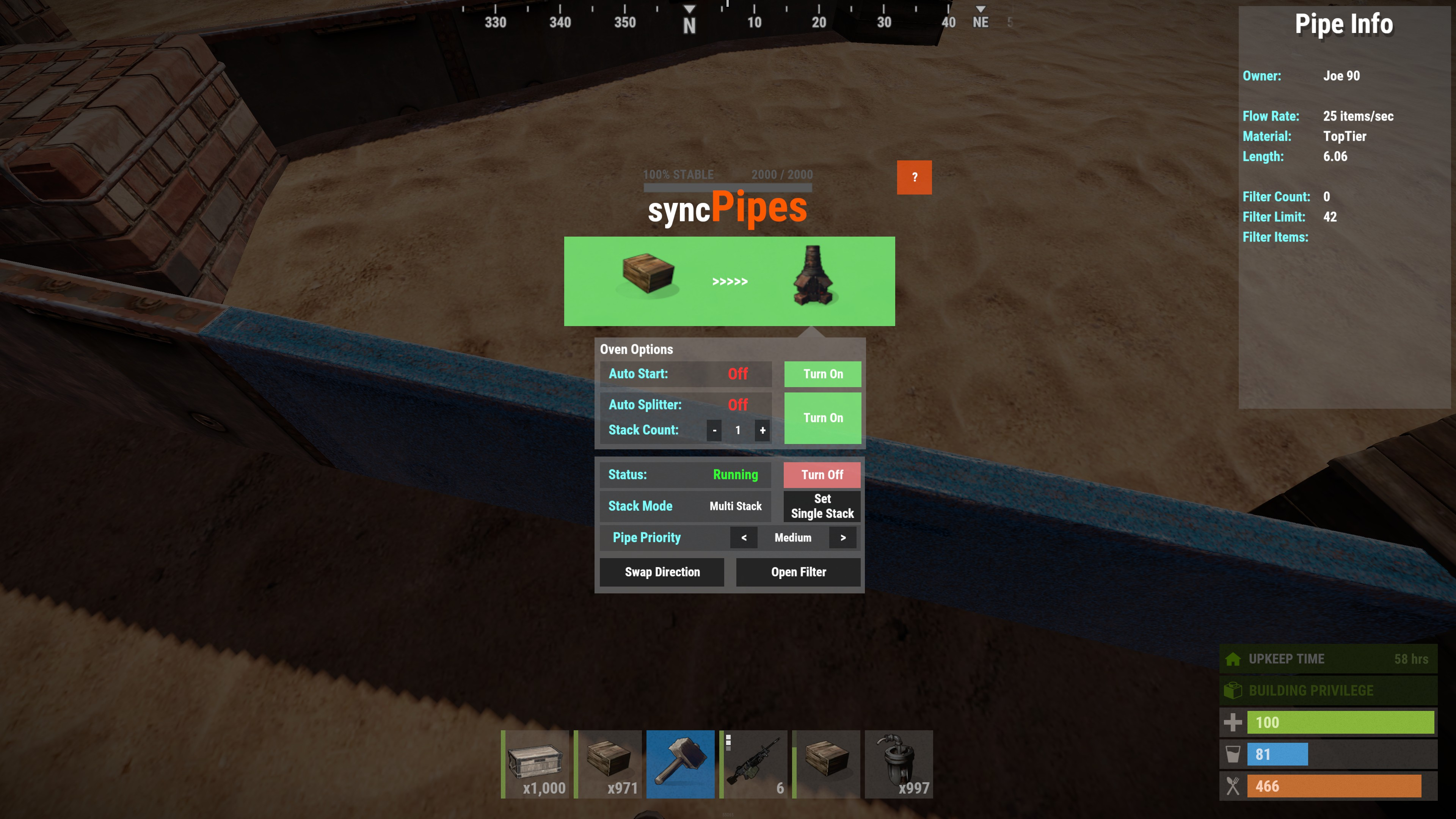
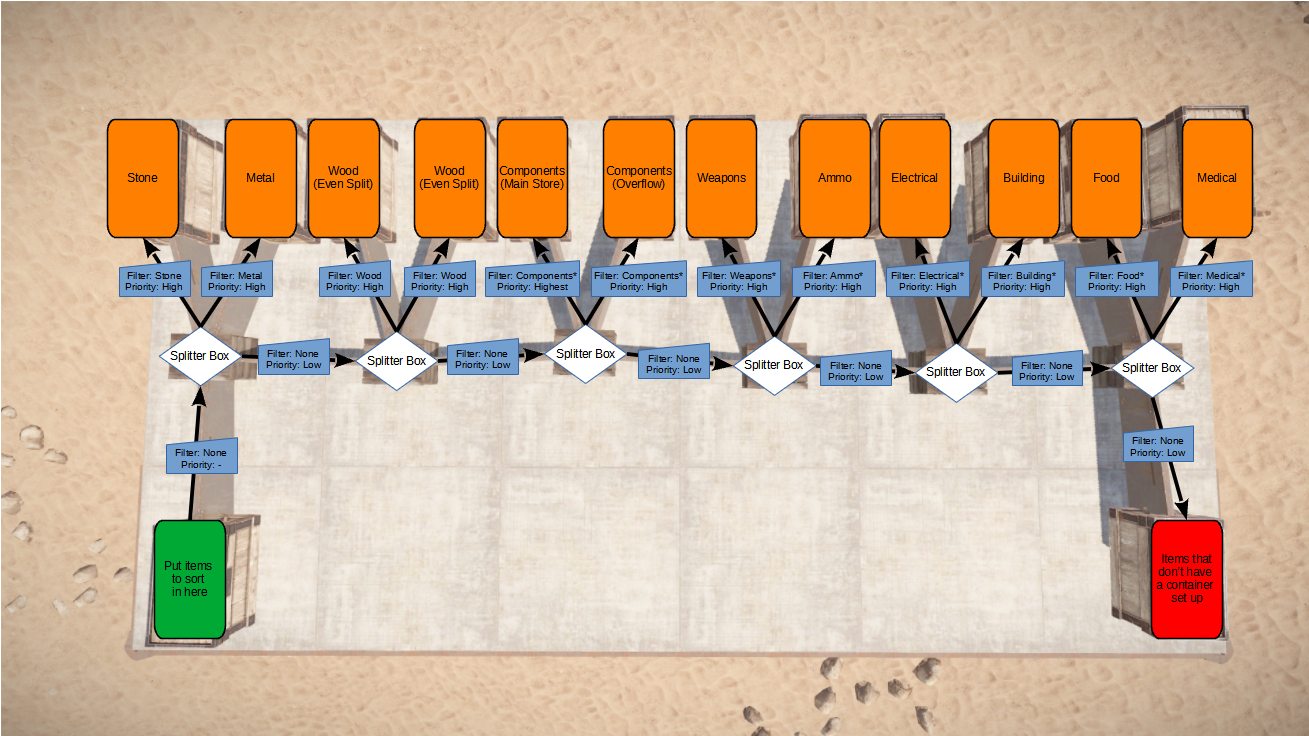
- - - -= = = = I M P O R T A N T = = = = - - - - This Mod is no longer running on RustEZ servers and has been superseded with the Industrial Update - - - -= = = = I M P O R T A N T = = = = - - - - Before I go into detail on what this plugin can do I'd like to say a big thank you to @Joe 90 for allowing me to grab his guide and posting it here for the RustEZ Community, all material here is from his mod page. Also a big thank you to TheGreatJ who made the amazing jPipes plugin, which this is based on. Sync Pipes has been re-written to make the pipes work synchronously with all pipes connected to the same container. This allows for advanced sorting and filtering of items into your containers, shops, furnaces, quarries, pumpjacks etc. What can it do? syncPipes allows you to connect multiple containers together to automatically: Move items between container Filter items to allow you to sort what goes where Splitting stacks evenly between multiple containers Send raw materials into a furnaces or refineries for processing Supplying fuel to Mining Quarries and Pump Jacks and collecting the output Auto-filling your shops with the correct items and collecting the payments Getting Started # How does it work? You can connect containers together to move items from one container to the other. Once created you can then change the settings of the pipe to do all sorts of things: Turn the pipe off to stop the transfer of items Set whether the items will fill the destination container or only take up 1 stack Add items to the filter to limit what the pipe can transfer Automatically start a Furnace, BBQ, Pump Jack, Quarry, Oil refinery or Recycler when the correct items are moved to it. Split the items evenly into multiple stacks in an oven using the Furnace Splitter mod. Reverse the pipe to send items back the other way # How do I create a pipe? Creating a pipe is very simple all you need to do is type /p into chat. You then need to use a wooden hammer to hit two containers and this will create the pipe. The first container you hit will start to transfer items to the second container. # How can I speed it up? The pipe only has a certain capacity to move items along it. The better the material the more items it can move at a time. To take advantage of this you can upgrade your pipes as you would any other wall by using the wooden hammer. Each upgrade will also give more slots to filter items with, but we'll cover that in more detail later. # How can I change the pipe's settings? Each pipe has a menu that you can open by hitting it with a wooden hammer. (hit the top of the pipe) For a pipe that just goes between normal containers (eg. furnaces, oil refineries etc.) you will get the following menu: The top bar (in green) shows the source and destination containers with items moving from left to right. The number of '>' between them shows the rate of items moving through the pipe. Status: This shows you if your pipe is running or not. You can start or stop the pipe by clicking the corresponding button to the right Stack Mode: This shows whether the pipe will fill the destination container or just make a single stack of items in it You can set the stacking mode of this pipe by clicking the corresponding button to the right Pipe Priority: This shows the priority that the items will use this pipe. (We'll cover this in more detail later) You can increase the priority by clicking the '>' button You can decrease the priority by clicking the '<' button Swap Direction: If you click this it will reverse the direction of the pipe and start moving items the other way. Open Filter: If you click this it will open a filter container that allows you to set what the pipe can transport. (We'll cover this in more detail later) In order for the filter to appear you must have upgraded the pipe at least to wood. At the top right of the screen is an info panel that give you an overview of the pipe and its filters. If the second container is a recycler, mining quarry or pump jack you would get the following menu with more options This now gives you additional options. This will only apply if it is the destination of the pipe. Auto Start: This shows if the pipe will attempt to start the destination when an item is moved to it You can turn it on or off by clicking the corresponding button to the right The final menu you will only see if the second container is a furnace or refinery. This gives you the final options Auto Splitter: This shows if the items should be split into even stacks in the furnace You can turn this on and off using the corresponding button to the right. Stack Count: This shows how many stacks the items will be split into in the furnace You can increase the number of stacks by clicking the '+' button You can decrease the number of stacks by clicking the '-' button If you need more hints in game click the '?' button and it will give you a description of each item. # How can I filter items? If you click 'Open Filter' from the pipe menu it will open the filter as a loot container in your inventory. You can then simply drag items into it to set this as something the pipe can allow through. Dragging an item means the pipe will no longer allow it through. The filter items are not added or removed from your inventory they are simply shown as an indicator of what is being filtered. If the pipe's filter is completely empty then the pipe will let everything through. # Can I send things to multiple containers? All pipes that are attached to a container will operate at the same time to move items from the container. If they are the same priority then the items will be split evenly amongst the pipes. # What commands are there? The /p command for creating pipes you already know, but there are a few extra commands that might come in handy /p r Remove pipes by hitting then with a wooden hammer /p c Copy the settings and filters from one pipe by hitting it with a wooden hammer and then hit other pipes to apply these settings to it. /p n Set a name to a container or pipe. This is useful if you have pipes running between two identical containers and you want to tell them apart. Or when you have long pipes want to know what they are for. /p s Get information on how many pipes you have and how many are running /p h Bringing up the in game help Advanced Sorting # Priority Each pipe has a priority. The first item in the container will be selected and grouped with all other stacks of the same item. This is then split evenly and sent along the highest priority pipes first (limited by the pipes flow rate). It will repeat this for the high priority pipes then the medium, the low and the lowest. The pipes will only move one type of item at a time for each priority level. # Combining the filter with the priority By combining the filter with the priority we can set up some advance sorting to allow items to be processed and sent to their correct destination with multiple routes and splits along the way. In This example you have a single container, on the left hand side, that you put everything into. The items then travel along the line of splitter boxes. If there is an appropriate container the item will be moved into it. Otherwise it will go into the container on the right hand side. This allows you to see what you might have missed from your sorting or could be connected to another set of filter pipes. Lets go through this in a little more detail. You'll notice that from the first splitter box there are two pipes going up into the "Stone" and "Metal" storage containers. there is also a pipe going to the next splitter box. The pipe going to the next splitter box has no filters on it which will allow precious stone and metal to not make it into their respective containers. To prevent this we just need to make sure that the priority of the pipes going to the "Stone" and "Metal" containers is higher than the pipe going to the next splitter box and hey presto all stone and metal will be filtered out. At the next splitter box you will see we have two "Wood" storage boxes and we want them to fill up at the same rate. Simply set them to the same priority and syncPipes will do the rest. Again make sure that the pipe leading to the next splitter box is set to a lower priority to prevent any wood escaping. At the next splitter we again have two containers that we want to store the "Components" in. However in this case we want the left container to fill up first. To do this just set the left container to a higher priority than the right and it will fill this one up first. Ensuring that the pipe to the next splitter box is the lowest priority to stop it taking any components. You can make this as simple or as complicated as you like. It's up to you... Again I would like to thank @Joe 90 for this wonderful guide and bringing Sync Pipes to the Survival Community. Below in the future I will add starter setups to help players wanting to learn more.

-
Its a mix between input and outputs and I have only noticed it on Quarries and Pumpjack containers. My experience; Prior to your last update my quarry and pumpjack had lost pipes feeding into the input containers. Just recently the output pipes had been wiped which was after your last update. My observations of other players pipes; The most resent restart caused in some setups inputs to be removed, others outputs removed, also seen a few that both inputs and outputs disapear. And to once again clarify this happens to both pumpjacks and quarries, if one has pipes removed so does the other and only seems to happen after a restart. This is only happening when the servers are restarted and upon loading back up logs throw out multiple lines of; [Sync Pipes] Failed to read pipe 17038491904889049257(76561198024860277) and [Sync Pipes] Failed to load manager [125110223 - ]: Container not found
-
It been good up until today. Reports of pipes connected to quarries and pumpjacks disapearing again. I can can confirm on mine it was only the output pipes but after checking some setups it looks like there are setups that loose both input and output pipes.
-
I havn't seen any issue been working fine for myself every day on AU Survival I have also asked a few other players on AU Survival today and they all can see the images.
-
Jacktapper tested it on EU Survival and its all good now.
-

Throwing a minicopter flare sometimes results in no minicopter appearing
Elixil3 commented on AlexaNightfire's bug in Issues
@Death To recreate this if you use a salvage hammer on the falling vehicle before it touches the ground you we recieve a flare with a blue sync symbol as if the skin has loaded. Throwing this flare will result in nothing happening just the normal flare light effects. -
this has already been reported here;
-
Can confirm this is now back to normal range
-
To add some more context to the pipes. Only pipes connected to a input or output of a quarry/pumpjack were removed. As for the items lost through them I have not noticed anything lost in my personal setup but do know if a pipe can not deliver enough fuel that the leveled pumpjack/quarry requires it will take it but not remember how much it has taken and wont start until more than the required amount has be transfered in one tick.
-
SAM sites have had a range buff and now engage at a further distance. I believe this may have been adjusted to accomidate the intercept of MLRS rockets in PvP. From this new distance you don't even hear or see them coming until its too late. Hopefully this can be adjusted so you can see what is firing at you before its too late. Please refer to image for a rough comparison between old and new.
-
Can confirm once the intial zombies are killed they are not respawning on AU Survival. I know Death is working on the loot tables.
-
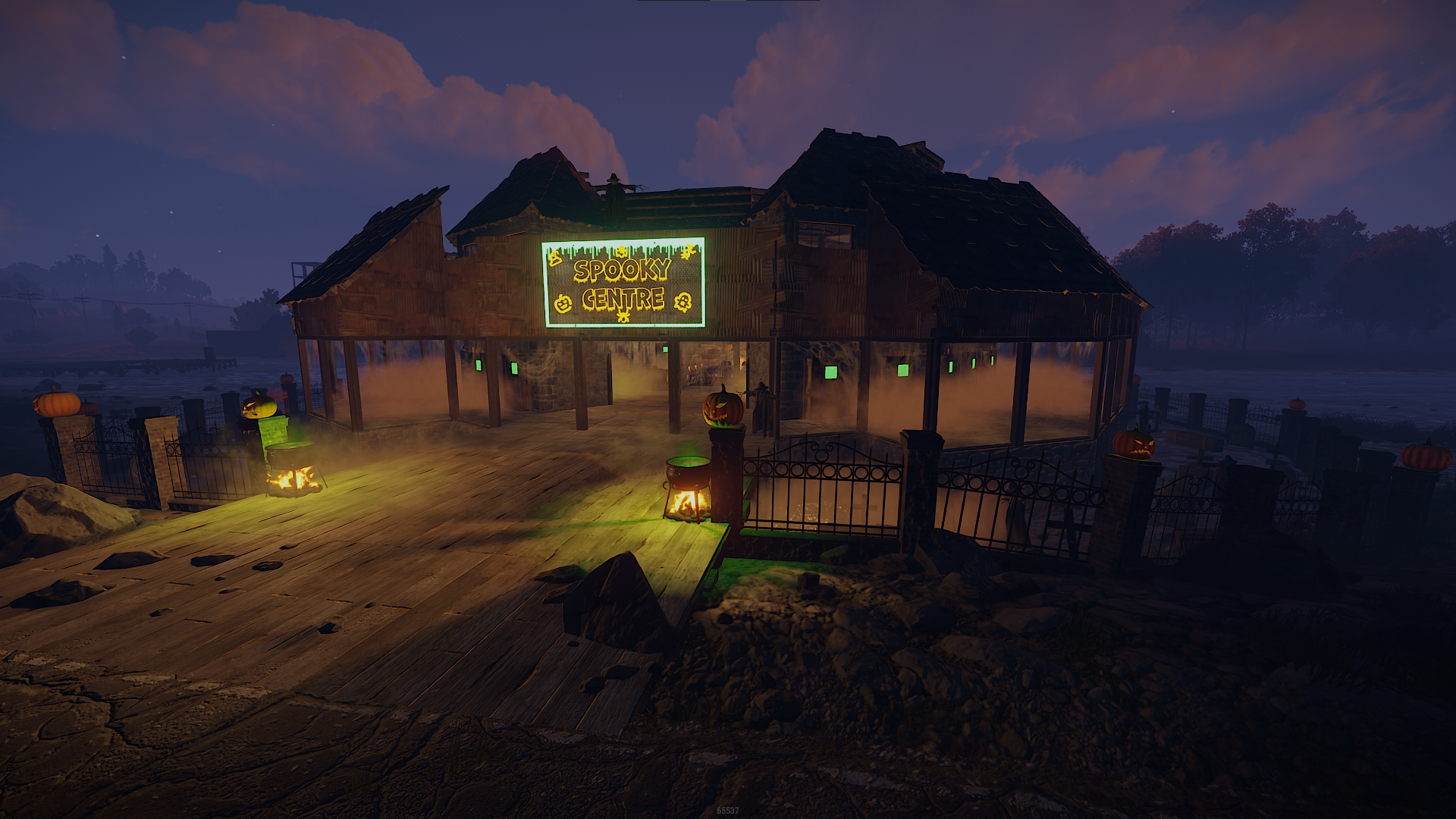
AU SURVIVAL - ADMIN BUILD Elixil3 What was the community centre is now; THE SPOOKY CENTRE " H14 "
- 53 replies
-
- 15
-

-

-
When players use crafted elevators in their base and not standing directly in the centre while in operation (usually up) they will get crushed. If seems the players mesh is colliding with the sides as the elevator moves.
-
This is due to the vending machines running out, they do restock daily but by the sounds of it players are emptying them before you get to it. From my experience on AU survival players will empty them within the first couple of hours they get restocked due to the high amount of stone to wood conversions.
-
Small Oil (AU) Scourge - Heavy Scientists bugged.
Elixil3 commented on BioHazardAust's bug in Issues
Same for AU Survival -
So by default there are 2 values that effect subs 1 is the standard outdoor decay timer and the other is a deep water decay timer. If the sub is under a roof but still within deep water then it will go by the deep water value, by default the deep water value it less than outdoors. I can only assume this was intentional by Facepunch so if a sub was left in a Underwater Lab moon pool it would decay over time to allow other subs access.
-
confirmed that it is not a facepunch bug, they can be crafted on official server.
-
While there are messages in your inbox you can not access the map options in the map overview. You can access them once all messages have been cleared out of your inbox.
-
With your latest release of updates today the upgrade buttons are broken again
-
this also applies to the Tool Cupboard "AutoUpgrade" button.
-
event AU Survival Event: Panic Platforms! June 27th 2021
Elixil3 replied to Elixil3's topic in Survival PVE
Thanks to everyone that participated in the event today . The following players just made it out alive taking with them the following rewards; Round 1: @Mijit - 2 supply signals (can be redeemed in new wipe) Round 2: @Angie - 2 supply drops next wipe Final Round: @Moonz88 - $10 EZ @Mijit- $5 EZ @Vanguard - 2 supply drops next wipe -
Join us this weekend on AU Survival for Panic Platforms! Everyone is welcome to join the chaos. Pull the "floor" out from under your friends, be the last one standing, and avoid the spike pit of death! Sunday, June 27, 2021 at 5PM AEST, on AU Survival! How to Play This event is a free-for-all style and the goal is to knock your opponents down off the twig platforms and into the spikes below. Everyone will start at the top of the structure, and players will slowly fall. Rules and Info - The last three players alive on the twig platforms will receive the top three prizes - Players will be given a kit consisting of a weapon, clothing, and ammo (wooden bow, 100 wooden arrows, one fire arrow). - Each player will have ONE fire arrow that will instantly break a platform. Use them wisely! - If you hit the spikes, or are not on a twig platform, you are out of the competition. It is possible to fall multiple levels which could get you in a wounded state. If you don't get back up, and die, you are out, although you can try to convince other players to help you back up. If you fall and hit the next floor you may shoot the platforms above you if there are players above. However, if you are out of the competition, including in the spike traps but still alive, you are not allowed to continue shooting the platforms above you. This will disqualify you from future rounds. Also, playing and glitching by standing on the wall frames will get you a disqualification. Prizes There will be multiple rounds. The top three finalists of each round will participate in a final round for BIG in-game prizes! *Prizes can be delivered to another RustEZ server upon request.* Just a reminder that all server rules apply during events as well. Good luck, and have fun everyone!