
Death
-
Posts
16,329 -
Joined
Content Type
Profiles
Forums
Help
Issues
FAQ
Features
Gallery
Store
Events
Applications
Everything posted by Death
-
The ban has been lifted.
-
Our team is made up of players who volunteer their time to uphold our community's standards. They log hundreds of hours a month to keep our servers a great place to hang out after a long day. We will not tolerate harassment toward our team. There are no exceptions. Because of this, we have denied your appeal and will not consider future ones.
-
New update released to dial that back a bit.
-
The new Zombie 3.0 update is live and we can't wait to hear your feedback and ideas to help evolve our AI to make it standout amongst our other modded server offerings. If you have a minute please let us know your first impression or any feedback you have so far!
-
Postponed until further notice.
-
Now that we've enabled decay for an entire wipe we'd like to collect player feedback to see if you'd like to keep it enabled, or prefer to go back to how it was without decay. Feel free to share feedback after you submit your vote.
-
You can hover over the reward now and it explains what it is. Perhaps not the best explanations right now but it gives you a good idea.
-
Looting in general. Nothing monument specific comes to mind.
-
I'll consider this when we refresh that hud.
-
This may be related to the issue we resolved. I'll pull a backup and compare the data to see if we can simply just restore.
-
Changed Status to Closed
-
This was a game bug that's now been fixed.
-
Changed Status to Released Changed Commit to a7b3bf9
-
Changed Status to Released Changed Server to Survival Changed Commit to 031eb15
-
Changed Status to Working
-
Changed Status to Closed
-
There was a client update that should fix this. Let me know if you're still having issues and I'll pass it off.
-
 Changed Status to Closed Changed Server to Survival
 -
All good. I did test on my end and it is working accordingly. Verified by a few players as well. Closing this for now.
-
Changed Status to Released
-
Changed Status to Working Changed Server to Survival
-
Will be in the Scavenger tree when it comes out.
-
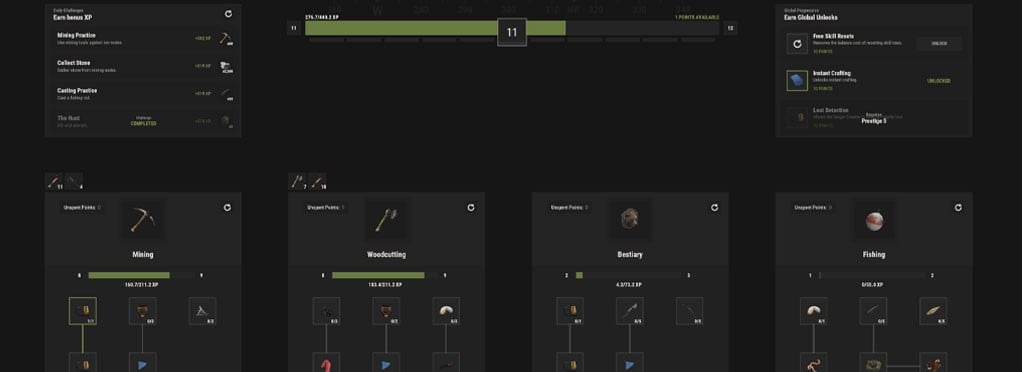 Skills add long-term progression to everyday activities such as Mining, Woodcutting, Bestiary, and Fishing. Earn XP by gathering resources, hunting animals, fishing, and using supported tools. Type /s to open the Skills menu. Skill Progression Each skill has its own level and perk tree. Earn a Skill Point every 5 skill levels and unlock perks including increased yields, reduced tool durability loss, resource detection, instant smelting, improved fishing, and more. Tool Levels Tools level up as you use them. Higher-level tools provide an XP bonus, rewarding you for sticking with your favorite equipment. Global Progression Your overall level reaches 100, awarding a Global Skill Point every 10 levels. Spend these points in any skill tree or unlock powerful bonuses such as Free Skill Resets, Instant Crafting, and Loot Detection. Prestige Reach level 100 to Prestige and restart your progression with additional Global Points. Up to 10 Prestige levels are available. Daily Challenges Complete four rotating Daily Challenges for bonus XP. Don't like your objectives? Incomplete challenges can be rerolled.
 -
You can bind the exitui console command to a key to quickly close our menus without having to click the EXIT button. Open your F1 console and enter one of the following commands. Bind it to Escape bind escape exitui Pressing Escape will now close any supported server UI you currently have open. Bind it to Tab If you'd rather close menus when opening or closing your inventory, you can bind it to Tab: bind tab "inventory.toggle;exitui" It's important to include inventory.toggle when using Tab. Tab is normally used to open your inventory, so binding it to only exitui would prevent the key from toggling your inventory. Bind it to another key You can also bind exitui to any other convenient key. For example: bind mouse4 exitui Or: bind x exitui Replace the key with whichever one you prefer. For most players, we recommend binding it to Escape or adding it alongside inventory.toggle on Tab.
-
Turns out this already exists. I did update it to include all new CUI we've added since then. It's exitui and you can bind this to whatever key you'd like.