
Death
-
Posts
16,337 -
Joined
Content Type
Profiles
Forums
Help
Issues
FAQ
Features
Gallery
Store
Events
Applications
Everything posted by Death
-
Will be in the Scavenger tree when it comes out.
-
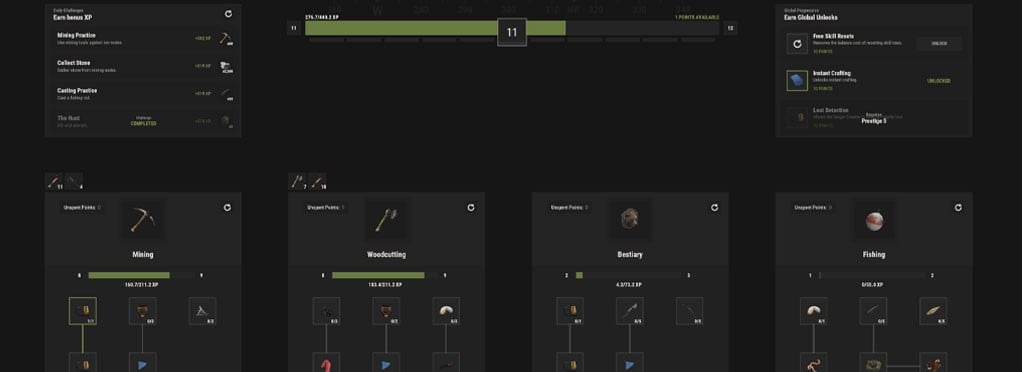 Skills add long-term progression to everyday activities such as Mining, Woodcutting, Bestiary, and Fishing. Earn XP by gathering resources, hunting animals, fishing, and using supported tools. Type /s to open the Skills menu. Skill Progression Each skill has its own level and perk tree. Earn a Skill Point every 5 skill levels and unlock perks including increased yields, reduced tool durability loss, resource detection, instant smelting, improved fishing, and more. Tool Levels Tools level up as you use them. Higher-level tools provide an XP bonus, rewarding you for sticking with your favorite equipment. Global Progression Your overall level reaches 100, awarding a Global Skill Point every 10 levels. Spend these points in any skill tree or unlock powerful bonuses such as Free Skill Resets, Instant Crafting, and Loot Detection. Prestige Reach level 100 to Prestige and restart your progression with additional Global Points. Up to 10 Prestige levels are available. Daily Challenges Complete four rotating Daily Challenges for bonus XP. Don't like your objectives? Incomplete challenges can be rerolled.
 -
You can bind the exitui console command to a key to quickly close our menus without having to click the EXIT button. Open your F1 console and enter one of the following commands. Bind it to Escape bind escape exitui Pressing Escape will now close any supported server UI you currently have open. Bind it to Tab If you'd rather close menus when opening or closing your inventory, you can bind it to Tab: bind tab "inventory.toggle;exitui" It's important to include inventory.toggle when using Tab. Tab is normally used to open your inventory, so binding it to only exitui would prevent the key from toggling your inventory. Bind it to another key You can also bind exitui to any other convenient key. For example: bind mouse4 exitui Or: bind x exitui Replace the key with whichever one you prefer. For most players, we recommend binding it to Escape or adding it alongside inventory.toggle on Tab.
-
Turns out this already exists. I did update it to include all new CUI we've added since then. It's exitui and you can bind this to whatever key you'd like.
-
@ShadowStorm We don't have much of an edge on ours I'm afraid esc or tab is not an input sent to the server. I can however make a universal command you can bind that closes all of our UI in a future update.
-
Thanks for letting us know. I'll have this sorted next update if I'm able to reproduce.
-
Found any bugs? Have any feedback on our new skills feature? Please let us know here!
-
 I'm not able to reproduce. Seems I'm hitting the correct amount of resources for each tree hit. You able to record so we can validate numbers?
 -
The default is 50%. It can be boosted by power plant or the requisition in /shop
-
Looks like it was broken. I've released a patch.
-
Could you take a screenshot of what it looks like on your monitor? I'm a bit curious.
-
Only official servers can enable achievements. We used to have them enabled but Facepunch reached out and warned us doing so could get us blacklisted.
-
Which skins?
-
We've pushed back our planned migration to September 3rd.
-
This month, we’ll be featuring two monuments for players to explore, each offering a new destination, unique points of interest, and plenty to discover. Lighthouse Outpost An offshore safe zone combining the best of Outpost and Bandit Camp. Dock your boat, shop from a full selection of vendors, take on missions, recycle and refine resources, gamble, or use it as a convenient stop before heading farther out to sea. Cobalt Vaults A heavily guarded underground storage complex hiding whatever Cobalt would rather keep out of sight. Fight your way past scientists and the APC, reach the central control tower, and open the secure vaults one by one to uncover what’s stored inside.
-
- 1
-

-
This update could be months out. We just wanted to let you know our plans so it's not a surprise. It's not something we want to rush because this is suppose to be an upgrade for players, not a regression.
-
https://rustez.com/features/teleporting-r1/ https://rustez.com/features/trading-r5/ These are the exact same pages we have in-game. Both contain commands and usage.
-
Being black does not give you a racism pass. You were banned for pasting a blackface squid ward on a sign with the text "nigward" and another sign with the hard r. Also based on your Steam name history and profile pic I think it's safe to say your appeal has been denied.
-
It's still early, but the current implementation is there will be a terminal at every quarry and pumpjack. Once you interact with it you'll unlock it. You can access all unlocked terminals from any terminal. It will show a map of all your bases (using your cupboard) which you can then select where to pull fuel from and send output to. These will be delivered to your cupboard. So as of right now there's no special entity. That was the original idea but we've changed it up to make it simpler at least for now.
-
If it breaks we'll extract more money from you to fix it.
-
Changed Status to Working
-
We aren't interested in adding anymore "magic" features to the server. Our current system for vehicles is already pretty forgiving when it comes to crashing, etc.
-
Changed Status to Released Changed Commit to 86927c8
-
Changed Status to Closed
-
Playtime rewards aren't showing right hours server wide
Death commented on PyroMonster's bug in Issues
Changed Status to Closed